


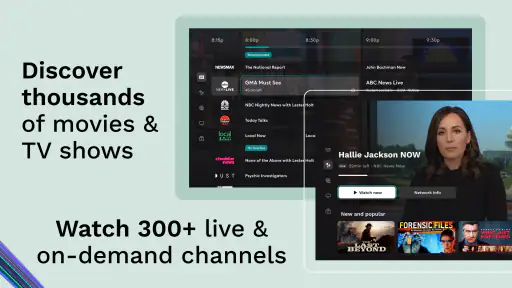
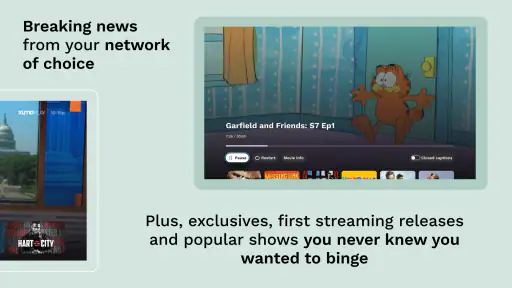
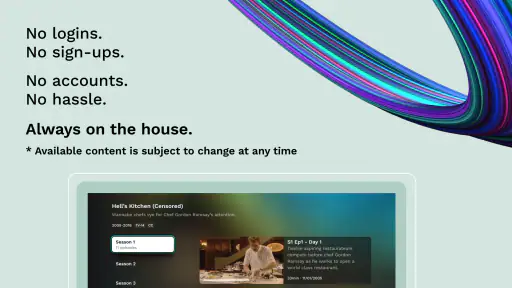
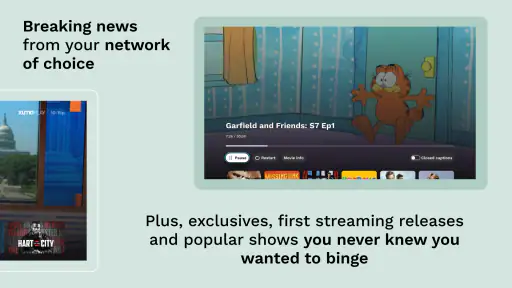
When I want something to watch without committing to another monthly subscription, I usually look for two things: a broad selection and a service that lets me decide how much personal information I want to share. Xumo Play sits in that space as a free entertainment app from XUMO LLC, offering live channels alongside movies and complete TV series available on demand. I found it most useful as a relaxed browsing service rather than as a replacement for every streaming platform I already use.
The basic appeal is easy to understand. You open the app, browse what is playing, and choose something without paying an entry fee. Its audience is broad too: the content rating is Everyone, so it is designed for general household use rather than a narrowly defined adult audience. That does not mean every program will suit every viewer, but it does make the app approachable for casual family-room viewing.
It has also been around long enough to feel established rather than experimental. XUMO LLC released it on June 14, 2019, and the app has passed five million installs. Its average rating is 3.6 from around two thousand ratings, while the store page contains around one hundred thirty written reviews. I read those figures as a sign of a service with a substantial audience but a mixed experience: popular enough to be familiar, yet not universally smooth.
How Xumo Play feels when you use it
A free starting point with a different rhythm from paid streaming
The biggest adjustment is that this is not simply a free copy of a subscription catalog. The live-channel side gives the experience a television-like rhythm. Instead of spending ten minutes deciding among endless thumbnails, I can open the app and see what is currently available. That makes it handy when I want background entertainment, a quick break, or something to put on while eating.
On-demand movies and full TV series add flexibility, but I would not approach the catalog expecting the same predictable depth as a paid service built around exclusive releases. The strength here is variety and immediacy. The trade-off is that the most important question is often not “What is the newest show?” but “Is there something enjoyable on right now?”
That distinction matters when choosing between Xumo Play and the usual alternatives. A subscription service is generally better when I already know the exact film or series I want and expect it to remain available. A paid live-TV package may be better for someone who needs a particular set of premium channels. Xumo Play makes more sense for viewers who value free access, casual discovery, and the ability to watch without building their entire routine around one subscription.
A realistic everyday use case
Imagine finishing work with only half an hour before dinner. I would not necessarily want to start a new premium drama, search through several apps, or remember where I left off. Xumo Play works well in that moment: I can browse the live selection, choose something already in progress, or switch to an on-demand title if I want a more deliberate choice. The app becomes a television replacement for a short window, not another project to manage.
It can also suit a shared living room where people do not agree on one long-term subscription. One person may want a familiar series, another may prefer a film, and someone else may simply want live programming in the background. The free model lowers the argument about whether the service is worth adding to the household budget.
What to check before you depend on it
I would still test the app during the kind of viewing session that matters to you before making it your main entertainment source. If you need a very specific program, search for it rather than assuming that a large selection guarantees its presence. If you want uninterrupted control over playback, compare the live experience with the on-demand section instead of treating both parts as identical.
Another practical point is device compatibility. The current version is 4.9.147 and the minimum operating-system requirement is Android 6.0. That makes it accessible to many older Android devices, although an older phone or tablet may still provide a less comfortable viewing experience than a recent television or modern handset. I would also keep the app updated where possible, especially if playback or navigation behaves inconsistently.
Trust starts with visible choices
For me, evaluating a free entertainment app is not only about how many things it can play. The business model makes trust important. When I am not paying a subscription, I pay closer attention to what the app asks for, which choices are presented clearly, and whether I can use it without feeling pushed into decisions I do not understand.
That is where I prefer to be cautious and practical. I would review the permission prompts as they appear, read any privacy or consent screens before accepting them, and avoid granting access that does not seem relevant to watching video. I would also look at the app’s settings after installation rather than assuming the first-run choices are the only controls available.
The useful habit is to treat every permission and consent screen as a choice, not as a formality. If a prompt is unclear, I would pause and check its wording before continuing. This does not make the app difficult to use; it simply keeps the viewer aware of the boundary between watching content and sharing information.
Account controls and the low-commitment advantage
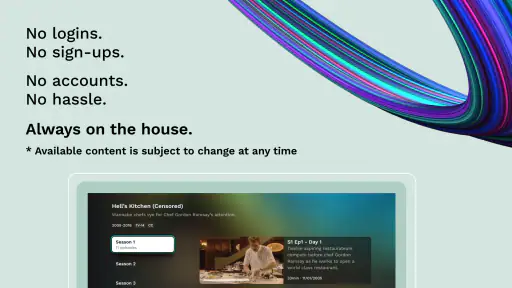
One reason a free streaming app can be attractive is that it may fit into a low-commitment routine. I do not have to approach Xumo Play as a major household contract. That makes it easier to try, keep installed for occasional viewing, or remove if it does not suit my habits.
At the same time, I would not assume that “free” means “no data considerations.” I would inspect the sign-in flow, any personalization options, and the account area if the app presents them. The important question for me is whether I understand what each choice does. If the app offers a way to continue with fewer account commitments, I would favor that for casual use; if a feature requires an account, I would decide whether the benefit is worth it before registering.
This is also where Xumo Play differs from a traditional television channel. A television set can feel anonymous because there is no visible app account or consent screen in front of you. With a streaming app, I have a clearer responsibility to review settings, keep credentials private, and avoid using the same password I rely on elsewhere.
Moments when data awareness matters most
The most data-sensitive moments are usually not while a program is playing. They happen during installation, first launch, sign-in, personalization, and any later settings change. Those are the points when I would slow down and read rather than tap through quickly.
I would be especially careful if the app asks to connect with another service, remember viewing preferences, or enable notifications. Notifications can be useful for bringing me back to the app, but I would turn them off if they become distracting. Personalization can make browsing easier, yet I prefer to know whether I can use the service without accepting every optional recommendation or promotional setting.
On a shared device, I would also think about viewing privacy. A family tablet or living-room device can be used by several people, so I would check whether the app leaves an account signed in and whether another viewer could change settings. If I were using it on a device that is not mine, I would avoid saving credentials and would sign out when finished if that option is available.
Where the viewing experience can be frustrating
The free model is appealing, but it naturally comes with compromises. Live programming gives me less control than an on-demand subscription, and browsing can feel less efficient when I have a precise plan. I may find something interesting quickly, but I may also spend time scanning options that do not match my mood.
There is a psychological trade-off too. A paid service encourages me to use the catalog I am already paying for, while a free service is easy to open and easy to abandon. That is excellent for spontaneous viewing, but less helpful if I want a carefully organized watchlist or a dependable long-term viewing plan.
I would skip it as my primary service if I need exclusive releases, a guaranteed collection of particular titles, or a highly controlled premium-TV replacement. I would also choose another option if my household depends on precise parental arrangements, advanced profile separation, or a particular channel lineup that Xumo Play does not provide in the way we need.
How I would set it up for a better first session
I would install it on the device where I actually plan to watch, rather than judging the experience only on a small phone screen.
I would review the first-run permission and consent prompts carefully, accepting only choices I understand and want.
I would browse both the live area and the on-demand selection, because they serve different viewing moods.
I would test a short session before relying on it for a family movie night or a longer viewing block.
I would revisit notifications, account settings, and privacy choices after using the app for a few days.
This workflow reveals something a store summary cannot: whether the app fits the way I watch. Someone who enjoys channel surfing may appreciate it immediately. Someone who opens a streaming app only to play a named film may find the experience less satisfying, even if the catalog is broad.
Who gets the most value from it
I would recommend Xumo Play to viewers who want a free entertainment option for occasional use. It is particularly suitable for people who like live television’s sense of discovery but still want the option to choose an on-demand movie or full series. It can also be useful as a backup service when a paid subscription is unavailable, paused, or not worth adding for a particular month.
It is a sensible fit for a casual viewer who does not want to enter payment details just to find something to watch. It may also work well in a household that wants a general-purpose option for different ages, provided adults still check whether a specific program is appropriate for the people watching.
Who should choose something else
I would point a dedicated movie fan toward a paid service if their priority is a stable, carefully selected catalog and predictable access to particular titles. I would point a sports-focused viewer toward a service built around the competitions and channels they follow. I would also suggest comparing other free streaming apps if the main priority is a different interface, stronger personalization, or a specific type of programming.
That is not a criticism of Xumo Play so much as a reminder that free and broad are not the same as perfectly targeted. Its value comes from reducing the barrier to casual viewing. It is less compelling when my requirements are narrow and non-negotiable.
My cautious verdict after weighing convenience and control
Xumo Play is worth trying if I want a free way to move between live channels, movies, and complete TV series without treating entertainment as another monthly bill. Its five-million-plus install reach suggests that it has found a substantial audience, while the 3.6 average rating reminds me to keep expectations realistic rather than assuming every device and viewing habit will feel equally smooth.
I like the low-commitment nature of the service, but I would use it with the same care I apply to any connected entertainment app. I would read permissions, review visible data and account choices, limit notifications that I do not need, and avoid leaving a personal account open on a shared device. Those steps give me more control without taking away the convenience that makes the app appealing.
The app is free, and its Everyone age rating makes it approachable, but the right recommendation depends on what you expect from it. If you want spontaneous television-style browsing and a no-cost backup for films and series, I think it deserves a place on your device. If you want a precise premium catalog, advanced household controls, or guaranteed access to a particular title, I would compare it with a more specialized alternative first.
Overall, I see it as a practical companion rather than a complete replacement for every streaming service. Its best moments come when I have time to browse, want something easy to start, and appreciate having choices without a subscription decision. Its weaker moments appear when I demand certainty, deep personalization, or complete control over what plays next. Used with those limits in mind, Xumo Play is a reasonable free entertainment app that gives viewers useful choice while still leaving the final decisions about permissions, accounts, and viewing habits in their own hands.


